 Created by renowned Harvard health care professionals.


Keyboard Wrist Rest: Help or Hype? How to Use One the Right Way
A keyboard wrist rest is a helpful tool when it supports the heel of your palm during pauses, and hype when it is sold as a carpal tunnel treatment. Here is what the research shows, how to use one the right way, how to choose the best one, and what no wrist rest can do.

Keyboard Wrist Rest: Help or Hype? Our Doctors’ Answer
Written by Jeff Conley, President of First Hand Medical · Clinically reviewed by Alan Ward, MOT, OTR, Master Occupational Therapist and VP of Precision Rehabilitation, Blanding, Utah · Last reviewed: November 2026
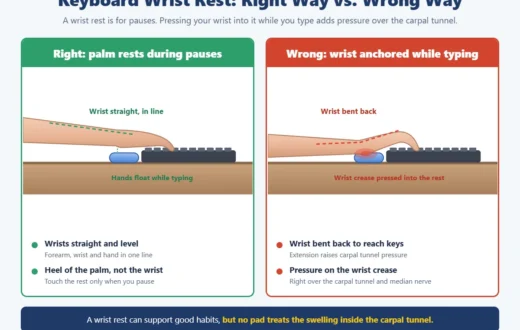
A keyboard wrist rest is both. Used the right way, it is a helpful tool that supports the heel of your palm during pauses and encourages straight, neutral wrists. Sold as a carpal tunnel treatment, it is hype. Our doctors are direct about this: no pad, cushion or gel bar can clear the swelling and entrapped inflammation inside the carpal tunnel. And used the wrong way, with the wrist crease pressed into the rest while you type, it can add pressure right over the median nerve.
On This Page
- It is for pauses, not for typing. Rest the heel of your palm on it between bursts; let your hands float while you type.
- Palm, not wrist. The rest should touch the fleshy heel of the hand, never the soft crease of the wrist.
- Straight wrists matter most. Bending the wrist back raises pressure inside the carpal tunnel.
- Height and shape beat material. Gel, foam, wood or leather all work if the rest is level with the keyboard and rounded.
- It doesn’t treat carpal tunnel. Ergonomics reduce strain; healing comes from relieving the pressure inside the tunnel.
What a Keyboard Wrist Rest Does, and What It Doesn’t
A keyboard wrist rest, also called a keyboard palm rest or wrist pad for keyboard use, is a cushioned bar that sits in front of the keyboard. It has three jobs:
- Support the hands during pauses so your arms can relax instead of hovering for hours.
- Keep the wrists from dropping below the keys, which bends them back.
- Cushion the hard desk edge so it doesn’t dig into the underside of your wrist.
What it doesn’t do is just as important. A wrist rest can’t reduce swelling in the soft tissue, restore circulation to the median nerve or stretch tight tissue. It is an ergonomic accessory, not a treatment. Think of it as part of a good desk setup, along with the right keyboard, mouse, chair and screen height; see our carpal tunnel ergonomic checklist.
Do Wrist Rests Help? What the Research Shows
The short answer to “do wrist rests help?” is: it depends on how you use them. The U.S. Occupational Safety and Health Administration (OSHA) notes that opinions vary on wrist and palm supports, but proper use has been shown to reduce muscle activity and help keep wrists in a neutral position. OSHA also warns that resting the wrist or palm on a support while typing may limit wrist motion and lead to more awkward postures. Its advice: hands should move freely above the rest while you type, and when you pause, the pad should touch the heel or palm of your hand, not your wrist.
Wrist Angle Changes Carpal Tunnel Pressure
Researchers at the University of California measured pressure inside the carpal tunnel while experienced typists typed with their wrists in different positions. Bending the wrist back (extension) or toward the thumb raised the pressure, and the act of typing raised it further compared with holding the same position still. A separate study of computer mouse use found that pressures in many participants were above levels known to affect nerve function. That is why keyboard wrist rest ergonomics come down to one goal: keep the wrist straight and avoid pressing on it.
Pressure From the Outside
The carpal tunnel sits just under the skin at the crease of your wrist. Anchoring that crease on a firm edge, a desk or a rest adds outside pressure on top of the pressure inside the tunnel. Our doctors see this pattern constantly in people who type and mouse all day. Describing the kinked wrist positions people hold at night and at work, occupational therapist Alan Ward, MOT, OTR, puts it simply: “They’re putting it in that kinked position and they’re stressing that nerve out repeatedly.”
How to Use a Keyboard Wrist Rest the Right Way
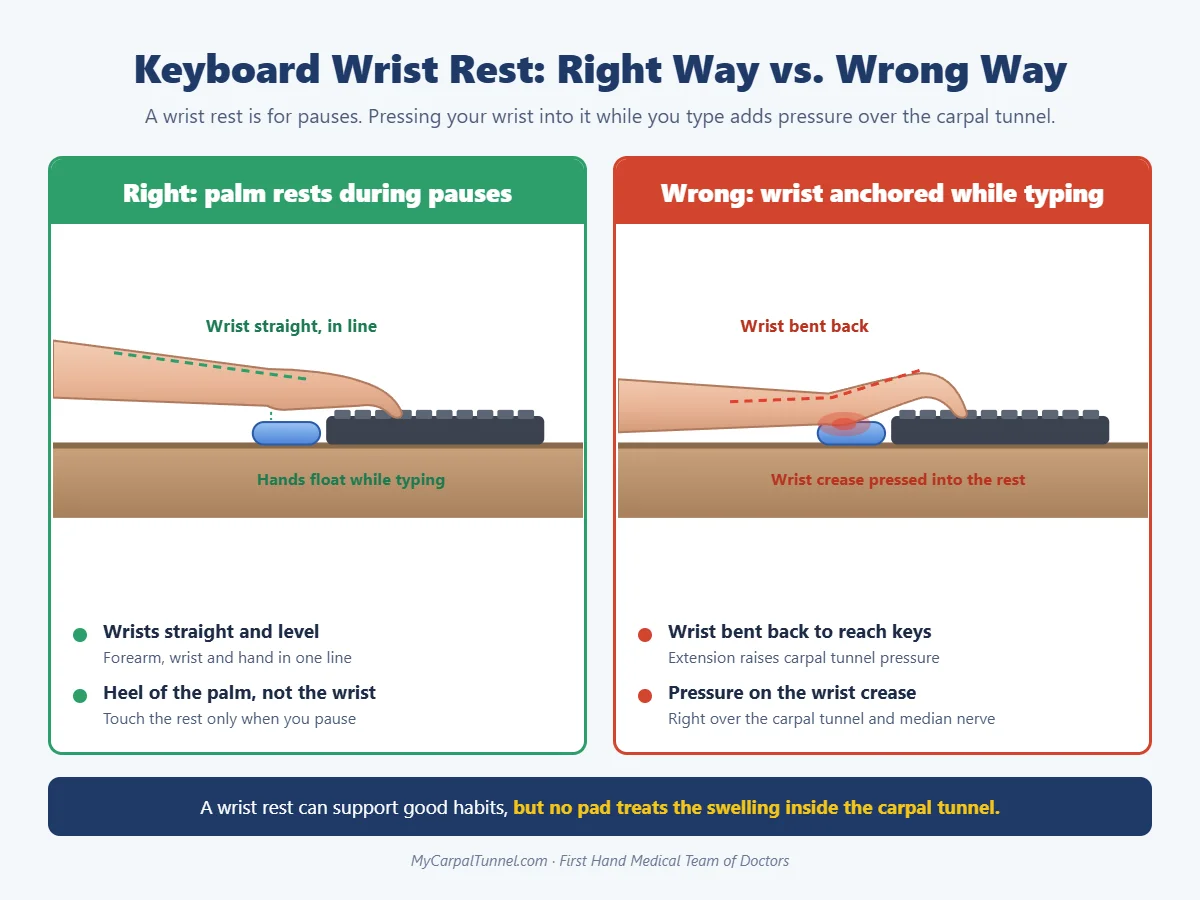
- Set the height first. Adjust your chair so your elbows are bent about 90 degrees and your forearms are level with the keyboard.
- Flatten the keyboard. Fold the little feet on the back of the keyboard down, or tilt it slightly away from you, so your wrists don’t bend back.
- Match the rest to the keyboard. The top of the rest should be level with the front edge of the keyboard, not higher.
- Float while you type. Keep your hands slightly above the rest and move from the elbow and shoulder, not just the fingers.
- Rest the heel of the palm during pauses. The fleshy pad below the thumb and pinky should touch the rest, never the wrist crease.
- Take breaks every 20 to 30 minutes. Open your hands, shake them out and stretch.
For more on arranging the whole desk, see working with carpal tunnel and our ergonomic tools for carpal tunnel guide.
Signs Your Desk Setup Is Working Against You
- A red line or dent across the underside of your wrist at the end of the day
- Tingling or numbness in the thumb, index or middle finger after long typing sessions
- Aching in the forearm or the base of the thumb
- Waking at night with numb hands after a heavy computer day
If you notice these, check your wrist rest height and habits first, then your chair, keyboard tilt and mouse position. Writers, programmers, accountants, gamers and anyone doing data entry for hours a day benefit most from getting this right; see the webmaster’s Patient Experience for one example.
Choosing the Best Keyboard Wrist Rest
The best keyboard wrist rest is the one that fits your keyboard, your hands and how you work. Material matters less than height, shape and firmness.

Gel Keyboard Wrist Rest
A gel keyboard wrist rest feels soft and stays cool. Look for one with a firm core so your palms don’t sink and tilt your wrists.
Memory Foam
Memory foam molds to your palm and is comfortable for long days. It holds heat and can flatten over time, so replace it when it no longer springs back.
Wooden Wrist Rest
A wooden wrist rest is firm, stays level and looks at home with mechanical keyboards. Choose one with a rounded front edge, since a hard square edge presses into the skin.
Leather and Leatherette
Leather-covered rests are firm with a slightly softer top and wipe clean easily. Check that the height matches your keyboard.
What Makes an Ergonomic Wrist Rest
- Level with the front of the keyboard, not higher than the space bar
- Rounded, padded front edge with no sharp corners
- At least 1.5 inches deep, as OSHA recommends, and about as wide as the keyboard
- Firm enough that your hands don’t sink
- Supports the heel of the palm, not the wrist
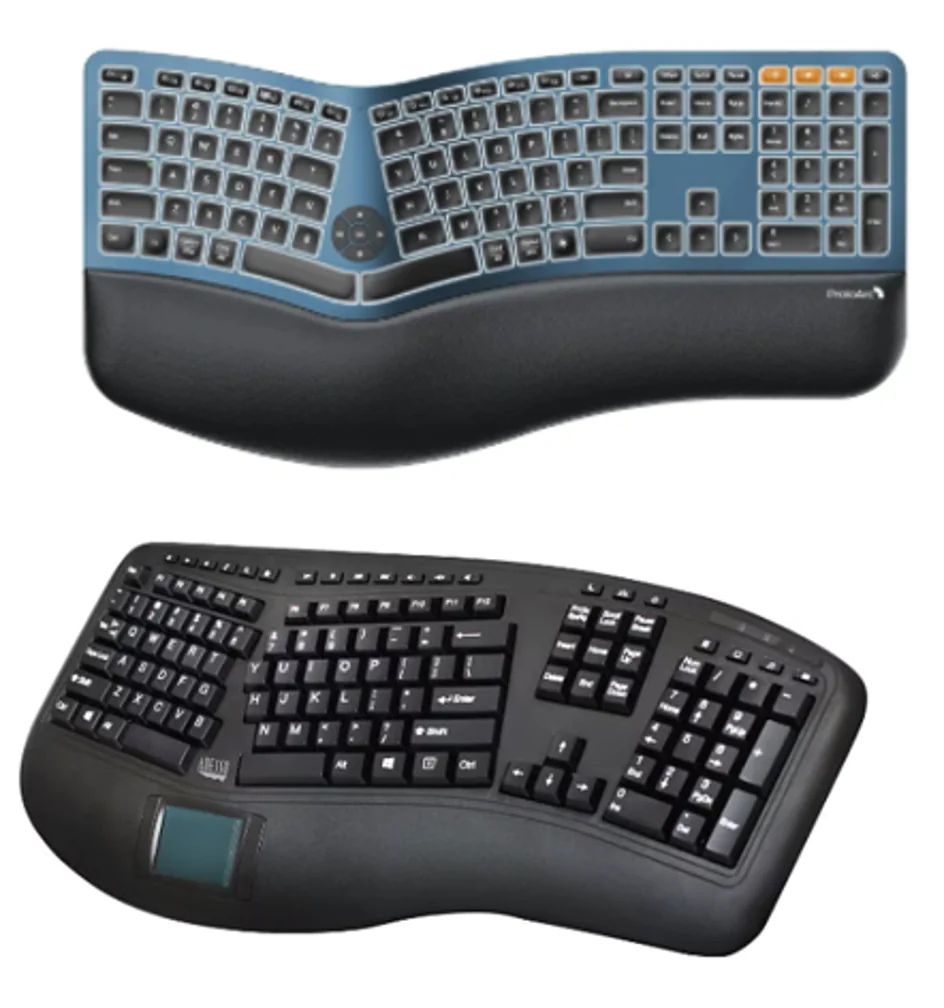
A computer keyboard wrist support works best with a keyboard that keeps your wrists straight in the first place.
Wrist Rest for Laptop Users, and Wrist Rest for Keyboard and Mouse Sets
Wrist Rest for Laptop
Laptops are hard on wrists because the keyboard is fixed to the screen, and the sharp front edge often presses into the wrist. A thin wrist rest for laptop use can soften that edge, but the better fix for long work sessions is to raise the laptop to eye level on a stand and use a separate keyboard and mouse with their own palm rests.
Wrist Rest for Keyboard and Mouse
Many keyboard wrist support sets come with a matching mouse pad. The same rules apply to both: keep the wrist straight, let the hand move freely, and rest the heel of the palm only during pauses. Mouse work concentrates strain on one hand, so read about carpal tunnel from a mouse and the mouse wrist rests we recommend.
Keyboard Wrist Support vs. Wrist Braces for Typing
Some people try to solve typing pain with a rigid wrist brace instead of a keyboard wrist support. Our doctors advise against wearing one for long periods. A splint can shield the wrist from painful movement, but it carries two separate costs. Unused muscles weaken, leading to muscle atrophy. Splints also restrict blood circulation and lymph fluid flow, which slows soft-tissue healing. They are necessary for fractures and sprains, but are a poor choice for chronic conditions; use one only for temporary relief, never long term. See carpal tunnel braces for typing.
A well-placed wrist rest supports good posture without immobilizing anything. That makes it a far better daily companion at the keyboard than a brace.
The Hype: What No Wrist Rest Can Do
Wrist rests are often marketed with “carpal tunnel relief” on the box. Our doctors want you to know the difference between easing strain and treating the cause. Carpal tunnel syndrome starts with pressure inside the tunnel: swelling and entrapped inflammation in the soft tissue in and around the carpal tunnel squeeze the median nerve and restrict blood flow and lymphatic fluid transport. A cushion on your desk can’t reach that.
If you already have numbness, tingling, night waking or dropping things, good ergonomics will help you stop making it worse, but you also need to relieve the pressure inside the tunnel. That is what our doctors developed the Carpal Solution to do. Its targeted passive stretching restores flexibility to the injured soft tissue, relieves pressure on the median nerve, relieves restrictions on blood circulation and lets lymph fluid flow freely to clear out the swelling. It is your body that does the healing; the Carpal Solution just jump-starts the natural healing preempted by excess pressure from inflammation and swelling.

- Over 220 hours of targeted stretching in the six-week protocol, while you sleep.
- Most people are better from their worst symptoms in two to three weeks.
- About 90% get complete remission in 6 weeks; the other 10%, usually people with excess systemic inflammation, are 40 to 70% better at six weeks and reach full remission in 10 to 12 weeks.
- 97% patient satisfaction over 21 years and 4.9 out of 5 stars on independent review sites like Google Reviews. Over 100,000 people have used it.
Pair it with a good desk setup, breaks and gentle stretches. See how the Carpal Solution hand orthosis works, read how a computer professional got relief, and if symptoms linger, follow our Persistent Symptoms Protocol.
Before You Consider Surgery
Conservative-first care follows medicine’s oldest rule: first, do no harm. Carpal tunnel surgery has a patient satisfaction rate lower than 69%, because about 31% of patients report lingering or recurring symptoms after surgery, and no patient is satisfied with lingering symptoms. See recurrence after surgery. Try a well-reviewed conservative treatment for at least 12 weeks first, and start while you wait for carpal tunnel treatment; the average wait for a new-patient doctor appointment is 31 days.
When Healing Needs a Doctor’s Help and Professional Medical Evaluation
- Constant numbness that does not improve or loss of feeling in the fingertips that does not improve in 4 to 8 weeks.
- Extreme loss of the muscle at the base of the thumb, with loss of grip strength that does not improve over 6 to 8 weeks.
- Worsening symptoms over 6 to 8 weeks while using the best conservative treatments
- Symptoms that begin suddenly after hand or wrist trauma, a fracture or severe sprain from a fall or auto accident.
- Odd Symptoms that are not consistent with the Carpal Tunnel Symptoms listed on this website, that might be indicative of other nerve issues. A nerve conductivity study can clear up the confusion with minimal costs and not too much pain and no risk.
These signs may mean more advanced nerve involvement or a different condition and deserve professional medical evaluation and in person consultation. Home treatment can be used alongside professional in-person medical care while you wait for the healthcare delivery system to fit you into their schedule. There is no reason to wait doing nothing. You can start proven natural conservative treatment with good patient reviews while you wait for your appointments. If your symptoms start improving over 6 to 8 weeks, then you know you are on the right track and surgery is not necessary.
Frequently Asked Questions About Keyboard Wrist Rests
Do wrist rests help with carpal tunnel?
They can help prevent strain when used correctly, by supporting the heel of the palm during pauses and keeping the wrists straight. They do not treat carpal tunnel syndrome, because they cannot reduce the swelling and inflammation inside the carpal tunnel.
Should you rest your wrists while typing?
No. Let your hands float above the keys while you type, and rest the heel of your palm on the wrist rest only during pauses. Resting the wrist while typing can limit motion and press on the carpal tunnel.
What is the best keyboard wrist rest?
One that is level with the front of your keyboard, rounded and padded, at least 1.5 inches deep, about as wide as the keyboard and firm enough not to sink. Gel, memory foam, wood and leather can all work.
Is a gel or memory foam wrist rest better?
Gel stays cool and holds its shape quickly; memory foam molds to your palm but holds heat and can flatten. Choose the one that keeps your wrists level and feels comfortable for your hands.
Do I need a wrist rest for a laptop?
A thin rest can soften a laptop’s sharp front edge, but for long sessions it is better to raise the laptop on a stand and use a separate keyboard and mouse.
Is a wrist brace better than a wrist rest for typing?
Our doctors advise against long-term wrist braces. Unused muscles weaken, and splints restrict circulation and lymph flow, which slows soft-tissue healing. A correctly used wrist rest supports posture without immobilizing the wrist.
Sources
- Computer Workstations eTool: Wrist/Palm Supports. U.S. Occupational Safety and Health Administration.
- Computer Workstations eTool: Additional Information. OSHA.
- Rempel DM, Keir PJ, Bach JM. Effect of wrist posture on carpal tunnel pressure while typing. Journal of Orthopaedic Research, 2008.
- Keir PJ, Bach JM, Rempel DM. Effects of computer mouse design and task on carpal tunnel pressure. Ergonomics, 1999.
- Wall BT et al. Acta Physiologica, 2014 (doi 10.1111/apha.12190): about 8% loss of muscle size and 23% loss of strength after 14 days of immobilization.
- Bland JD. Patient-reported outcomes of 1,268 carpal tunnel operations. Muscle & Nerve, 2001 (PubMed 11410921).
- AMN Healthcare. 2025 Survey of Physician Appointment Wait Times (average 31 days for a new-patient appointment).

Developed by First Hand Medical’s Team of Doctors
The Carpal Solution Treatment Kit was developed by our expert team of medical doctors who have worked at and led some of the top medical institutions in the World – Including Harvard Medical, Tufts Medical, UCSD, UF Health, and The Ohio State University. We treat root causes with clinically proven conservative treatments. The results: Quick Natural Relief of All Your Carpal Tunnel Symptoms without complications.

Order Your Six Week Carpal Tunnel Treatment Now
The ONLY treatment for carpal tunnel that comes with a no questions asked 30-Day Satisfaction Window and in-house dedicated pain relief team.