 Created by renowned Harvard health care professionals.



Written by Jeff Conley, President of First Hand Medical · Clinically reviewed by Alan Ward, MOT, OTR, Master Occupational Therapist and VP of Precision Rehabilitation · Last reviewed: November 2026
An ergonomic keyboard for carpal tunnel will not heal carpal tunnel syndrome on its own, but the right keyboard can take daily strain off your wrists while your hands recover. This guide explains what research says about keyboard design and carpal tunnel pressure, the main types of carpal tunnel keyboard, how to choose one, and how to set it up.
Table of Contents
Why Your Keyboard Matters for Carpal Tunnel
The muscles that move your fingers live in your forearm, and their nine tendons pass through the carpal tunnel beside the median nerve. In a laboratory study, typing itself raised the fluid pressure inside the carpal tunnel compared with holding the hand still, and bending the wrist back (extension) or toward the thumb side raised it further (Rempel, Keir and Bach, 2008).
A flat, standard keyboard pushes most people into two of those positions: wrists bent back and angled outward toward the little finger (ulnar deviation). Typists commonly work with about 10 to 15 degrees of ulnar deviation on a conventional keyboard, and split keyboards have been shown to reduce it (Marklin and Simoneau). A good keyboard for carpal tunnel is one that lets your wrists stay straight.
Types of Ergonomic Keyboard for Carpal Tunnel
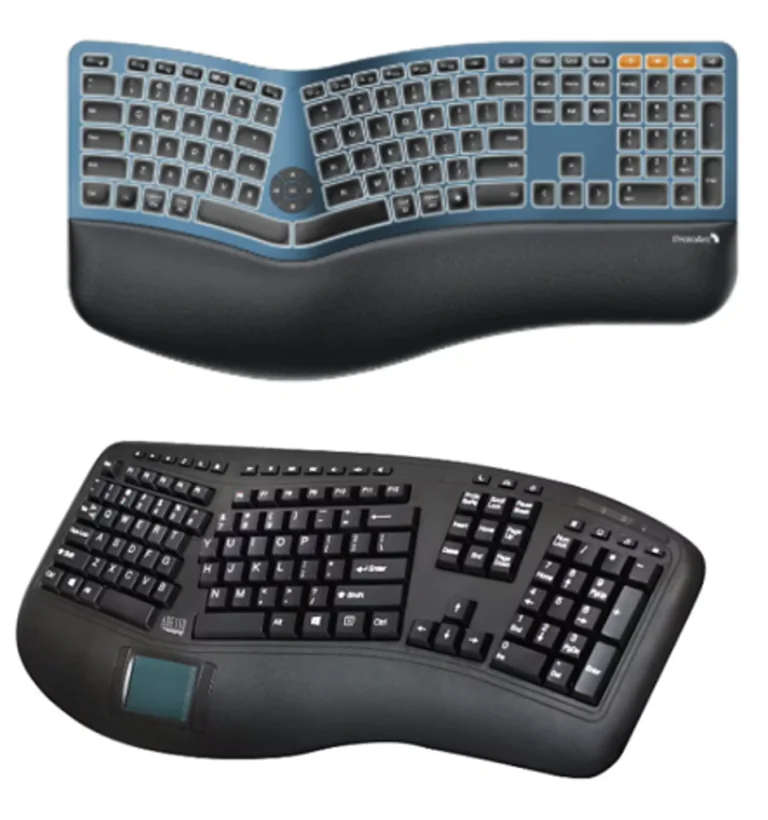
- Split keyboard for carpal tunnel. The keys are divided into two halves, either fixed at an angle or fully separate, so your hands sit shoulder-width apart and your wrists do not bend outward.
- Tented keyboard. The middle is raised so your palms tilt toward each other, reducing the twist of the forearm that a flat keyboard requires.
- Negative-tilt or low-profile keyboard. A flat or slightly back-sloped keyboard reduces wrist extension. Fold the little feet under most keyboards away for the same effect.
- Curved or wave keyboard. A gentler step toward a split design for people who do not want to relearn typing.
- Compact (tenkeyless) keyboard. Removing the number pad lets your mouse sit closer, so your right arm does not reach out to the side.

How to Choose the Best Keyboard for Carpal Tunnel
The best keyboard for carpal tunnel is the one that keeps your wrists straight and that you will actually use. Our occupational therapy advice:
- Start with a fixed split or curved keyboard if you are new to ergonomic keyboards; a fully separate split keyboard gives the most adjustment but takes a few weeks to learn.
- Choose light, smooth keys. Heavy keys add finger force with every keystroke.
- Avoid keyboards that sit high off the desk; the higher the keyboard, the more your wrists bend back.
- Look for a padded palm rest for pauses, not for resting while you type.
- Pair it with a mouse that fits your hand; see our guide to the best mouse for carpal tunnel.
There is some evidence that keyboard design can affect new cases: a review of keyboard research noted that a fixed-split design reduced the incidence of new carpal tunnel cases and symptoms in one workplace study (Moore and Swanson, 2003, cited in McLoone et al., Ergonomics, 2009). Keyboards to prevent carpal tunnel are a sensible part of a workstation, alongside breaks and treatment.
Set Up Your Keyboard the Right Way
- Place the keyboard at or slightly below elbow height, with your shoulders relaxed and elbows close to your sides.
- Keep your wrists straight, not bent up, down or to the side.
- Center the keyboard on the letter keys, not the whole keyboard, so you are not reaching to one side.
- Float your hands while typing and rest your palms only during pauses.
- Type lightly, and take a short break every 30 to 45 minutes to do gentle carpal tunnel stretches at your desk.
For the full workstation, see our carpal tunnel ergonomic checklist and our guide to carpal tunnel from typing.

The Best Keyboard for Carpal Tunnel by Type of Work
Different jobs put different demands on a keyboard for carpal tunnel. Writers, coders and data-entry workers who type for hours at a time often get the most benefit from a fully split or tented design, because the hours add up. People who switch between typing and the mouse all day may do better with a compact split keyboard that lets the mouse sit closer. Gamers and people who need fast key response can look for low-profile mechanical switches with light actuation force.
If you share a desk or travel, a portable split keyboard or a curved keyboard is easier to move than a large tented model. Whatever you choose, give yourself two to three weeks to adjust before deciding whether a carpal tunnel keyboard is working for you; an unfamiliar layout can feel awkward at first even when it is better for your wrists.
Using a Laptop With Carpal Tunnel
Laptop keyboards are small, flat and fixed to the screen, so you either bend your neck to see the screen or bend your wrists to type. For more than an hour or two a day, raise the laptop on a stand and use an external ergonomic keyboard for carpal tunnel and a separate mouse. That one change often does more for wrist posture than any single gadget. See our guide to ergonomic tools for carpal tunnel for stands, trays and palm rests.
Signs Your Keyboard Is Not Enough
If numbness wakes you at night, your fingers tingle when you pick up your phone, or you are dropping things, the problem has moved past posture. Those are signs of swelling inside the carpal tunnel, and the best keyboard for carpal tunnel will not clear it. Our doctors’ clinical experience is that people with three or more of the carpal tunnel symptoms on this site can be about 95% confident they have carpal tunnel syndrome; that is clinical experience, not a published statistic, so still get a formal diagnosis.
What a Keyboard Cannot Do
Ergonomic devices change wrist posture, but posture is only part of the picture. In one study of patients who already had carpal tunnel syndrome, a vertical mouse, a gel mouse pad and a gliding palm support all improved wrist position, yet none of them lowered the pressure inside the carpal tunnel (Schmid et al., Applied Ergonomics, 2015). Once the tissue is swollen, a better keyboard helps you avoid making things worse, but it does not clear the swelling.
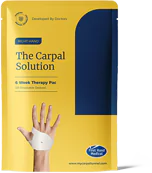
That is where treatment comes in. Swelling and entrapped inflammation in the soft tissue in and around the carpal tunnel squeeze the median nerve and restrict blood flow and lymphatic fluid transport. The Carpal Solution’s targeted passive stretching, worn at night, relieves pressure on the median nerve and lets lymph fluid flow freely to clear out the swelling. It is your body that does the healing; the Carpal Solution just jump-starts it. Most people are better from their worst symptoms in two to three weeks, and it has 97% patient satisfaction over 21 years.
A splint holds the wrist in a neutral position, which can reduce pain from movement, but it does not promote healing from carpal tunnel syndrome. Carpal tunnel surgery has a patient satisfaction rate lower than 69%, because about 31% of patients report lingering or recurring symptoms. If you are waiting for a doctor, the average new-patient wait is 31 days (AMN Healthcare, 2025), so you can start while you wait for carpal tunnel treatment.
Keyboard for Carpal Tunnel FAQs
What is the best keyboard for carpal tunnel?
A split, tented or curved ergonomic keyboard that keeps your wrists straight and sits low on the desk. The best choice is the one you will use all day.
Does an ergonomic keyboard for carpal tunnel really help?
It can reduce wrist bending and daily strain, and one workplace study found fewer new cases with a split design. It does not clear swelling that is already there.
Is a split keyboard for carpal tunnel hard to learn?
Fixed split and curved keyboards take a few days; fully separate split keyboards can take a few weeks. Most people adapt.
Should I use a wrist rest with my carpal tunnel keyboard?
Use a soft palm rest during pauses, not while typing. Resting the underside of the wrist on a hard edge while you type adds pressure over the carpal tunnel.
Can keyboards prevent carpal tunnel?
A good keyboard lowers one risk factor, wrist posture. Breaks, light typing and treating early symptoms matter just as much.
References: Rempel DM, Keir PJ, Bach JM. Effect of wrist posture on carpal tunnel pressure while typing. J Orthop Res. 2008;26:1269–1273. · Marklin RW, Simoneau GG. Split keyboard opening angle and wrist ulnar deviation. · McLoone HE, et al. Ergonomics. 2009. · Schmid AB, et al. Ergonomic devices do not reduce carpal tunnel pressure in patients with carpal tunnel syndrome. Applied Ergonomics. 2015.
When Healing Needs a Doctor’s Help and Professional Medical Evaluation
- Constant numbness that does not improve or loss of feeling in the fingertips that does not improve in 4 to 8 weeks.
- Extreme loss of the muscle at the base of the thumb, with loss of grip strength that does not improve over 6 to 8 weeks.
- Worsening symptoms over 6 to 8 weeks while using the best conservative treatments
- Symptoms that begin suddenly after hand or wrist trauma, a fracture or severe sprain from a fall or auto accident.
- Odd Symptoms that are not consistent with the Carpal Tunnel Symptoms listed on this website, that might be indicative of other nerve issues. A nerve conductivity study can clear up the confusion with minimal costs and not too much pain and no risk.
These signs may mean more advanced nerve involvement or a different condition and deserve professional medical evaluation and in person consultation. Home treatment can be used alongside professional in-person medical care while you wait for the healthcare delivery system to fit you into their schedule. There is no reason to wait doing nothing. You can start proven natural conservative treatment with good patient reviews while you wait for your appointments. If your symptoms start improving over 6 to 8 weeks, then you know you are on the right track and surgery is not necessary.

Watch videos of people who “Cured” their Carpal Tunnel Naturally and Avoided the Risks of Carpal Tunnel Surgery!







Order Your Six Week Carpal Tunnel Treatment Now
The ONLY treatment for carpal tunnel that comes with a no questions asked 30-Day Patient Satisfaction Guarantee and in-house dedicated pain relief team.